How AI Image Editor Fits Image To Video Transition
The leap from a static creative asset to a functional video advertisement or product showcase has historically been a bottleneck for small product teams. While generative AI has promised to bridge this gap, the reality of text-to-video workflows often involves a lack of control that renders the output unusable for professional launch assets. When a brand’s visual identity is on the line, “randomly beautiful” results are a liability.
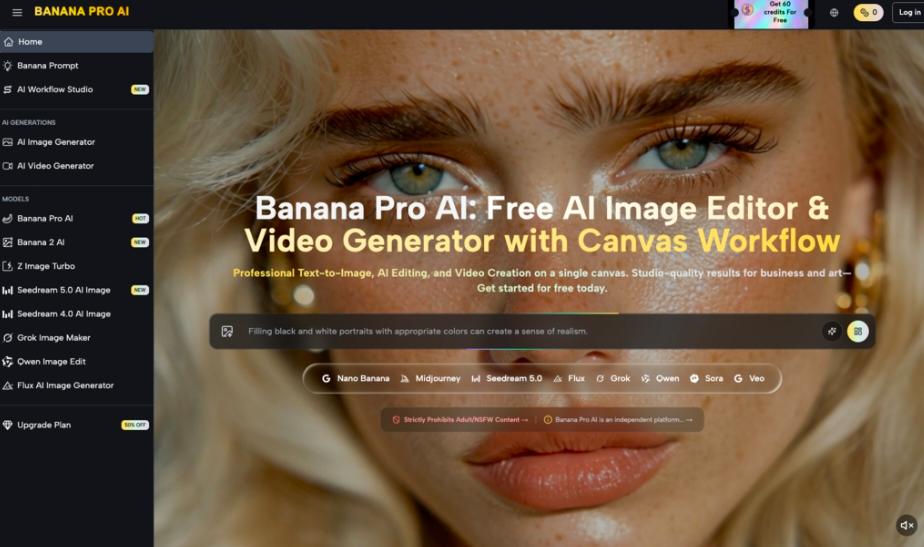
For many operators, the solution has shifted from pure prompt engineering to a more structured image-to-video pipeline. This is where the AI Image Editor within the Banana Pro ecosystem becomes the foundational layer of the production stack. By refining the source image before a single frame of motion is rendered, teams can dictate the lighting, composition, and object hierarchy that the video model must respect.
The Strategic Necessity of the Source Image
In most generative video workflows, the first frame is the “anchor.” If you start with a text prompt, the AI essentially hallucinates both the subject and its movement simultaneously. For a product team exploring AI visuals, this is too many variables to manage at once. If the AI gets the product shape right but the motion wrong, or vice versa, the entire generation is a waste of compute and time.
By utilizing the image-to-video transition, you decouple the visual design from the motion physics. You use an AI Image Editor to nail the brand-specific aesthetics—colors, shadows, and textures—first. Once that static frame is approved, it serves as a rigid constraint for the video generator. This approach moves the process closer to traditional cinematography, where the set is dressed before the camera starts rolling.
Refining Inputs with Nano Banana Pro
Within the workflow of Banana Pro, the choice of model determines the fidelity of the final render. While the standard Nano Banana provides a fast, iterative path for storyboarding and rough concept testing, it often lacks the temporal consistency required for high-end launch assets. It is excellent for checking if a motion concept—like a liquid pour or a camera pan—works in principle.
However, for a final asset, the transition usually moves toward Nano Banana Pro. This model is tuned for higher-density details and better adherence to the source image’s structural integrity. When a product team needs to ensure that a logo doesn’t warp or a specific product feature doesn’t “hallucinate” into a different shape during a three-second clip, the Pro variant offers the necessary guardrails.
The Role of the Canvas in Motion Control
One of the more practical developments in recent AI tools is the move toward a canvas-based interface. Instead of jumping between tabs, the Banana AI workflow allows for a non-linear approach. You might generate a base image, realize the lighting is too harsh for a video transition, and immediately use the AI Image Editor to soften the highlights on the same workspace.
This feedback loop is critical. In many cases, an image that looks great as a static file may contain “complexities” that confuse a motion model. High-contrast areas or busy backgrounds can lead to flickering or “boiling” artifacts in a video. A tool-savvy operator will use the editor to simplify these areas or define clear boundaries before passing the asset to the video generation stage.
Limitations of Current Image-to-Video Workflows
It is important to reset expectations regarding the current state of the technology. Even with a high-fidelity source image and a powerful model like Nano Banana Pro, certain physical interactions remain a challenge. For example, if you are attempting to animate a human hand interacting with a product, the AI frequently struggles with “contact physics.” The hand may clip through the object or lose its anatomical structure during the movement.
Furthermore, there is a distinct limitation in how much “new” information can be generated behind an object. If your source image is a tight shot of a product and you request a wide camera pull-back, the AI must invent the surrounding environment. While it can be surprisingly effective, the results often lack the grounding of a real-world set, leading to a “dreamy” or slightly blurred background that might not align with a premium brand aesthetic.
Optimizing the Nano Banana Pipeline
To get the most out of Nano Banana, teams should focus on “low-delta” motion. This refers to movements where the change between the first and last frame is significant enough to feel dynamic but not so drastic that the AI loses the thread of the original image.
- Kinetic Panning: Moving the camera across a static object. This is the most reliable way to create a video from a single image because the subject itself doesn’t have to change shape.
- Environmental Motion: Animating the background (clouds, steam, water) while keeping the main product (the source image) locked in place.
- Variable Motion Strength: Using settings to dictate how much the AI is allowed to deviate from the source. A lower motion strength keeps the product recognizable, while a higher strength allows for more creative, albeit riskier, transformations.
By focusing on these controlled movements, a product team can produce a suite of launch assets that feel cohesive rather than like a series of disconnected AI experiments.
The Practicality of the AI Image Editor for Post-Generation
The transition doesn’t always end once the video is rendered. Often, a video might be 90% perfect, but a specific frame has a visual glitch. A professional workflow involves taking that specific frame back into the AI Image Editor to fix the artifact and then using that corrected frame as a new seed for a revised generation.
This “circular” workflow—moving from image to video and back to image—is what separates hobbyist usage from professional production. It acknowledges that AI is a collaborative tool that requires frequent manual intervention to maintain quality standards.
Uncertainty in Temporal Consistency
One area where certainty is low is the predictability of long-form consistency. Currently, generating a 2-second or 4-second clip is the sweet spot for Banana AI. Attempting to extend these clips into 10-second or 15-second sequences often leads to a gradual degradation of the visual quality. The “memory” of the original source image fades as the model prioritizes the motion of the most recent frames.
For product teams, the best strategy is to generate multiple short, high-quality “micro-clips” and stitch them together in a traditional video editor. This bypasses the model’s temporal limitations and allows for much tighter control over the pacing and storytelling of the final asset.
Technical Evaluation: When to Scale Up
Deciding when to use Nano Banana versus Nano Banana Pro comes down to the complexity of the visual environment. If the source image contains a lot of text, fine lines, or specific architectural details, the standard model will likely smooth those over to prioritize motion fluidity. The Pro model, conversely, uses a more compute-intensive process to preserve those sharp edges.
For launch assets where text legibility on the product packaging is mandatory, the Pro model isn’t just a preference; it’s a requirement. However, for “mood” shots or social media teasers where the vibe is more important than technical precision, the faster iteration speed of the standard model is often more efficient.
Building a Repeatable Asset Pipeline
For a product team to successfully integrate these tools, the workflow should be documented and repeatable. It starts with a high-resolution base generation, followed by a refinement pass in the AI Image Editor to ensure brand alignment. Only once the “hero image” is locked should the team move to the motion phase.
This disciplined approach reduces the “slot machine” feel of generative AI. Instead of hoping for a good result, the team builds it layer by layer. The use of Banana Pro tools provides the technical infrastructure, but the operator’s judgment in the pre-production (image editing) phase is what ultimately determines the success of the output.
The Shift Toward Operator-Led Creation
The transition from image to video represents a shift in how we think about “creative” AI. We are moving away from the era of “type a prompt and pray” and toward an era of granular control. Whether you are using Nano Banana for quick ideation or Nano Banana Pro for high-fidelity execution, the focus is increasingly on the tools that allow for manual adjustment and refinement.
Ultimately, the goal for any product team is to spend less time fighting the AI and more time directing it. By mastering the image-to-video transition through a dedicated editor and a robust motion model, creators can finally produce AI-assisted visuals that are indistinguishable from high-budget studio photography—or at the very least, close enough to meet the demands of a fast-moving digital market.
While the technology still has its “uncanny” moments and physical inconsistencies, the progress in controlled motion is undeniable. For those willing to put in the work of refining their source images and managing their motion parameters, the potential for rapid, high-quality asset production is already here. Success in this space doesn’t come from the prompt alone; it comes from understanding the relationship between the static frame and the moving image.