
Stop Letting Stock Music Dilute Your Brand’s Energy
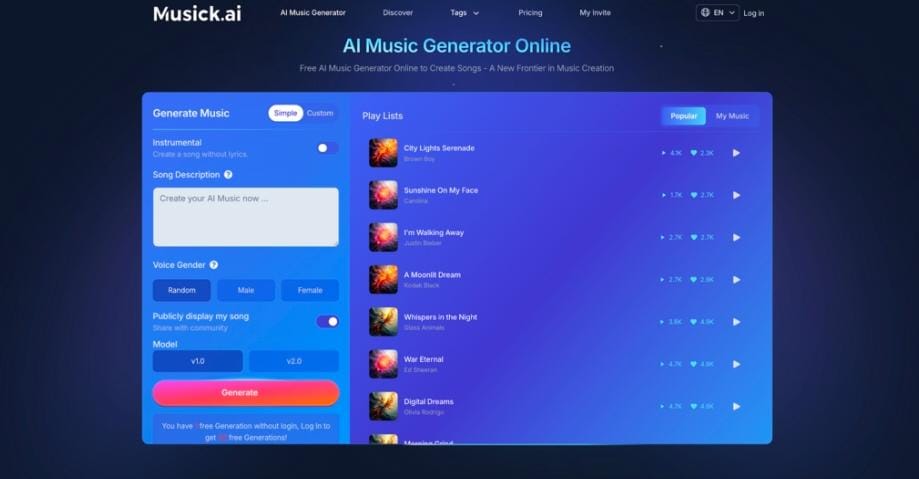
Stock tracks used to feel like a shortcut, but now they make brands sound interchangeable. Musick AI offers a different route: an AI Music Generator that creates songs shaped around each project instead of forcing projects to fit generic audio.
I. The Hidden Cost of Stock Music
- Everyone Is Using the Same Tracks
- Stock libraries recycle similar chord progressions, drum loops, and rises, so audiences start hearing the same patterns across ads, YouTube intros, and reels.
- When a viewer recognizes “that track from another video,” attention shifts away from the message and toward the repetition.
- Brands then compete on media spend instead of memorability, because sound no longer helps people tell them apart.
- Emotion Feels Generic, Not Specific
- Stock music is written to fit thousands of use cases, so it rarely captures the exact mood of a specific campaign or scene.
- A “motivational” track might clash with a thoughtful brand story, or a “cinematic” piece may overpower a quiet testimonial.
- Over time, this mismatch makes content feel assembled rather than crafted, reducing perceived quality.
- Licensing Headaches Slow Teams Down
- Even “royalty‑free” tracks come with terms, territories, and usage limitations that teams must double‑check.
- Expanding to new channels or regions can force teams to revisit licenses or replace music entirely.
- Legal uncertainty makes some creators play it safe, which further narrows sonic choices and weakens the overall vibe.
- Limited Flexibility During Editing
- Stock tracks arrive as fixed audio files, so editors must cut visuals around them instead of shaping music around the story.
- Short social clips, vertical edits, or alternate cuts often require awkward fades and loops.
- This rigid structure keeps content from hitting emotional beats precisely when they matter most.
II. Why Custom AI Music Changes the Game
- Tailored Sound for Each Project
- With Musick AI, teams describe the desired mood, style, and context in natural language, and the engine turns those ideas into complete songs.
- The AI Music Maker supports modes such as “Text to Music” and “Lyrics to Song,” so users can start from a creative prompt or full lyrics.
- Because each track is generated from a unique description, the resulting sound naturally aligns with the story, visuals, and brand tone.
- Fast Turnaround Without Sacrificing Quality
- The generator usually returns fully mixed audio in about one to three minutes, which fits easily into tight production timelines.
- Status indicators and clear success messages show exactly where each track is in the process.
- Quick iteration lets teams test several musical directions for a single asset before locking in the final cut.
- Clear Usage Rights for Commercial Projects
- Generated music comes with defined commercial rights, so creators can use tracks across campaigns, channels, and client projects once requirements are met.
- This removes much of the uncertainty around later re‑use or expansion to new formats like podcasts, apps, or games.
- Consistent terms also make it easier for agencies to document usage and reassure clients.
- Professional‑Grade Output from Day One
- Musick AI focuses on studio‑level audio, including high‑quality MP3 and WAV options for advanced users.
- Tracks are released with polished mixing and mastering, so they can sit next to label music on playlists without sounding thin or unfinished.
- Creators can still import files into a DAW to add extra sound design, stems, or effects whenever needed.
III. How to Make a Song on Musick AI
- Choose Your Creation Mode
- After signing in, head to the main generator area and pick between Text to Music and Lyrics to Song—these are the two core ways to create.
- Text to Music works best when there is a clear idea of mood, genre, and instruments but no finished lyrics yet.
- Lyrics to Song is ideal when the words are ready and the goal is to turn them into a full track with melody, harmony, and arrangement.
- Write a Clear Prompt or Paste Lyrics
- In Text to Music, type a description of the track in the prompt box, covering genre, mood, tempo, and instruments.
- If inspiration is low, use the built‑in prompt helper to get a detailed starting description that can be edited。
- In Lyrics to Song, paste structured lyrics into the lyrics field and, if needed, use the AI lyrics button to generate complete verses and choruses around a theme.
- Generate, Listen, and Refine
- Complete the simple verification if asked, then click the generate button to start the process.
- Wait a short moment while Musick AI turns the text or lyrics into a finished demo; new songs appear in the results area with a built‑in player.
- Listen critically, tweak the prompt or lyrics to correct mood, energy, or instrumentation, and regenerate until the track feels ready for real use.
- Save, Download, and Reuse
- When a strong version appears, save it in the personal library so it stays attached to the account for later campaigns.
- Download the song as high‑quality audio (MP3 or WAV, depending on plan) and drop it straight into a video editor, DAW, or content workflow.
- Keep the prompt and any seed information so similar tracks with the same vibe can be generated for future projects.
IV. Matching Music to Brand Identity
- Use Genre as a Brand Anchor
- Musick AI supports styles from EDM, R&B, and hip‑hop to jazz, classical, rock, reggae, country, and more, giving brands a broad sonic palette.
- Consistently choosing a narrow set of genres across ads, intros, and explainers helps audiences associate a recognizable sonic signature with the brand.
- Sub‑genres can differentiate campaigns: upbeat pop for launch content, ambient electronic for tutorials, and gentle piano for testimonials.
- Tune Emotion and Tempo to Each Touchpoint
- Descriptions can specify mood terms such as “uplifting,” “melancholic,” “energetic,” or “peaceful,” along with tempo guidance like “slow ballad” or “fast‑paced。”
- This allows a brand to craft calm onboarding flows, high‑energy announcements, or reflective founder stories without swapping libraries.
- Over time, using similar emotional cues across different assets makes the overall brand feel coherent and intentional.
- Align Vocals and Lyrics with Message
- The Lyrics to Song mode transforms structured verses and choruses into complete tracks with vocals that follow the written words.
- Internal teams can write lyrics around slogans, campaign themes, or product benefits, then have the AI Song Maker produce singable versions.
- When vocals echo key messages, recall improves, especially for intros, hooks, and short‑form video.
V. Practical Workflow: From Brief to Finished Track
- Start From a Clear Creative Brief
- Define the content type first: ad, social clip, explainer, podcast intro, or in‑store loop.
- Note audience, desired emotion, length, and any reference vibes (decade, instrument, or broad genre).
- Convert that brief into a concise description ready for the Text to Music or Lyrics to Song input box, so prompts stay aligned with strategy.
- Generate, Review, and Iterate Quickly
- Enter the description or lyrics, complete security verification, and click generate to start the process.
- Listen to the first track; if certain sections feel off, adjust mood, tempo, or instrumentation in the text rather than settling for “almost right。”
- Repeat until a track naturally supports the visuals, then save it to the library and share it with stakeholders for feedback.
- Prepare Files for Editing and Distribution
- Download the chosen version in the preferred format, such as high‑quality MP3 or, when available, WAV for more detailed mixing.
- Drop the file into a video editor or DAW, trim or loop as needed, and sync key transitions to on‑screen moments.
- Archive the final audio in a central asset folder with notes on prompt, mood, and project, so successful recipes are easy to reuse.
VI. Beyond Background Music: Strategic Advantages
- Build a Reusable Sonic System
- Because Musick AI saves every generated track in a personal library, brands can gradually assemble a custom catalogue instead of re‑licensing stock.
- These tracks can be organized by campaign, mood, or channel, forming a long‑term sonic toolkit that grows with each project.
- New content can then remix or extend familiar motifs, making the brand feel both fresh and consistent.
- Support Teams Across Channels and Roles
- Independent musicians can generate backing tracks and demos, while editors, marketers, and educators can create bespoke cues for their own tasks.
- Use cases range from YouTube and TikTok content to indie games, films, events, and classroom exercises, all drawing from the same core tool.
- Shared access to custom music keeps messaging aligned, even when different teams own different parts of the funnel.
- Reduce Risk While Encouraging Experimentation
- Since every track is unique and rights are clearly documented, teams can test bold musical ideas without worrying about surprise takedowns.
- Faster generation allows safe exploration of new genres or moods before committing them to major campaigns.
- This combination of safety and flexibility makes custom AI music a strategic asset rather than a last‑minute add‑on.
VII. Conclusion: Give Your Brand Its Own Voice
Stock music makes content sound familiar, but it also makes brands blend together. Musick AI offers tools to create original tracks that reflect each project’s tone, pacing, and message, turning background sound into a core part of brand identity. When teams replace generic libraries with a purpose‑built AI Music Generator and thoughtful prompts, every video, podcast, and reel gains a recognizably unique energy. For brands that care about long‑term connection, custom AI Music is no longer a novelty—it is a practical way to protect and strengthen the vibe that makes them stand out.